SpicyBox
SpicyBox: Turn Photos into AI-Generated Adult Videos
DeepDance.app: NSFW AI Dance Video Generator for Photo Animation & Motion Transfer
This page is based on editorial research and publicly available product information; it is not a hands-on test. Last checked: September 4, 2026
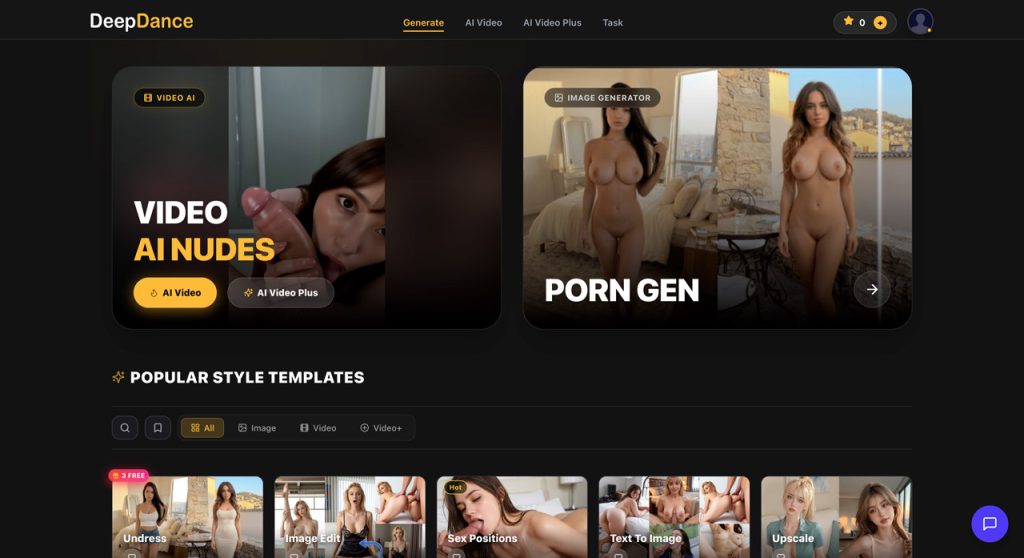
DeepDance.app is an adult AI video generator built around turning still images into short dance, motion, and performance-style clips. Instead of asking you to create a complete video from a long text prompt, the platform starts with an image and applies a selected motion or video template to it.
That makes DeepDance easy to understand. Upload or choose a suitable image, find a motion style you like, and generate an animated version. The focus is much more on movement and image-to-video than on still-image editing or AI companion features.
DeepDance is best described as an adult AI dance and image-to-video generator. Its main purpose is to take a static subject and give it movement using ready-made video or motion templates.
The source can be a realistic image, an AI-generated character, or another compatible visual. Once the image is selected, the platform uses AI motion generation to create a short animated clip based on the chosen template.
This puts DeepDance in a different category from tools such as DeepUndress.app. DeepUndress now covers a broad range of image generation and editing tools, while DeepDance is much more centered on giving an existing image movement.
The main DeepDance workflow begins with a still image. Rather than manually animating the subject, you select a prepared movement and let the AI transfer that motion into the generated video.
This is useful because realistic body movement is one of the more difficult parts of AI video generation. A template gives the model a clearer idea of what the subject is supposed to do instead of leaving the entire motion sequence open to interpretation.
The result is a much more guided experience than working with an unrestricted text-to-video model. You are choosing the type of movement first and letting DeepDance handle most of the animation process.
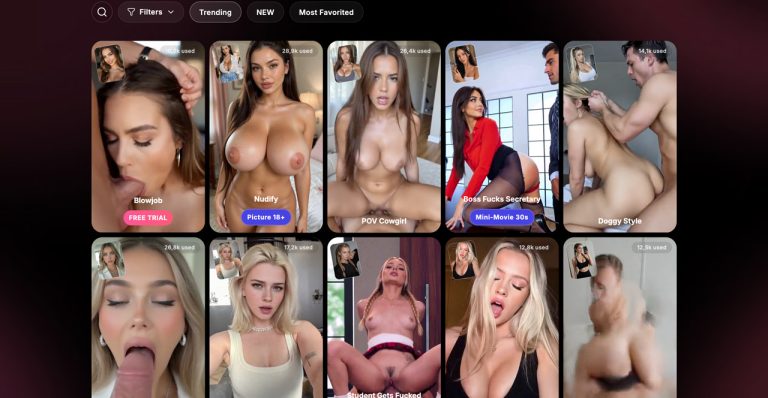
Templates are an important part of DeepDance. They provide ready-made motion ideas that can be applied to compatible source images, making it possible to create different clips without writing detailed prompts for every generation.
This also makes browsing part of the creation process. Instead of opening a blank generator, you can look through available motions, choose one that fits the image you already have, and see how that character performs with a different movement.
The obvious limitation is that a template-driven generator gives you less precise control than professional animation software or a highly configurable video model. You are working within the movements and generation options provided by the platform.
DeepDance keeps the basic process straightforward. A typical generation looks something like this:
There is no need to install a local video model or learn keyframe animation before creating something. That is a major part of the appeal for users who want a quick adult image-to-video workflow rather than a technical AI setup.
At the same time, the simple interface should not be confused with guaranteed results. AI motion generation still depends heavily on the source image.
The quality of the input makes a noticeable difference with this type of generator. A clear subject, visible body position, sensible framing, and an image that matches the intended movement give the AI more useful information to work with.
Difficult poses, cropped limbs, unusual viewing angles, obstructed bodies, or already distorted AI images can create problems once motion is added. Hands, legs, clothing edges, facial details, and body proportions are common areas where image-to-video models can struggle.
For that reason, it can be worth testing the same motion with more than one starting image instead of repeatedly regenerating from a source that is poorly suited to animation.
DeepDance can create convincing movement when the source image and selected motion work well together, but it should still be treated as generative video rather than traditional animation.
The strongest results usually preserve the character well enough while adding believable movement. Less successful generations may introduce changing facial details, unstable anatomy, background movement, or body parts that briefly lose consistency.
That variation is normal for current image-to-video technology and is one reason we would avoid judging the platform from a single generation.
DeepDance uses paid access for its more substantial generation workflows, with video creation typically tied to credits, premium access, or similar usage limits.
Video generation is computationally more expensive than basic still-image processing, so repeated experiments can consume a balance relatively quickly. This is especially relevant when an image needs several attempts before the movement looks natural.
We recommend checking the current DeepDance generation screen before purchasing, as credit requirements, available templates, video options, and paid packages can change over time.
DeepDance has a very clear purpose. It does not make you work through a large suite of unrelated AI tools before reaching the feature that matters: turning a still image into a moving adult clip.
The template approach also makes motion generation much easier for beginners. You do not need to describe choreography in detail or understand how AI video models interpret complex motion prompts.
We also like that the workflow works naturally with AI-generated characters. If you already have a still image you like, DeepDance gives you a way to reuse it rather than starting another character generation from scratch.
DeepDance is specialized, and that will not suit everyone. Users looking for a complete AI image editor, face swap suite, text-to-image generator, or advanced video-production environment will find broader platforms elsewhere.
Template-based motion can also become repetitive once you have tried the styles that interest you most. The experience depends heavily on the variety and quality of the available motion library.
Generation consistency is another limitation. An image that looks excellent as a still can expose problems once the body begins moving, and several attempts may be needed before getting a clip worth keeping.
Since those additional attempts can use paid generation credits, weak source images can become more expensive to experiment with than expected.
A general AI video generator usually gives you more freedom. You may be able to describe the camera movement, scene, action, environment, and visual style in detail through text prompts.
DeepDance takes the opposite approach. Its strength is having the motion idea prepared for you. Choose a suitable image, select a movement, and let the platform handle most of what happens next.
That makes DeepDance less flexible, but also considerably easier to use when your goal is specifically an adult dance or performance-style animation rather than an entirely original video scene.
Any service that accepts photographs of people for AI animation deserves additional care. Before uploading personal media, check DeepDance’s current privacy policy, storage rules, deletion options, and content restrictions.
Only use images you own or have clear permission to animate. Real people should not be placed into sexual or adult AI videos without their consent, and images involving minors or age-ambiguous subjects should never be used with an adult generation service.
Using fictional, AI-generated, self-owned, or clearly authorized adult characters avoids many of the privacy problems associated with transforming somebody else’s photograph.
DeepDance.app is most useful when you already have a still image you like and want to see that character move. Its focus on adult dance, motion templates, and image-to-video generation gives the platform a much clearer purpose than a general AI video toolbox.
The guided workflow is its biggest advantage. You can create movement without learning animation software or spending time describing complicated choreography through prompts.
The trade-off is less creative control and the usual inconsistency that comes with AI video generation. Some images animate much better than others, and experimenting with several versions can use credits quickly.
For users specifically looking for an adult AI dance video generator or a simple way to turn AI characters and still images into short motion clips, DeepDance is a much better fit than a traditional image editor or chat-focused adult AI platform.
Visit the official site to explore features, pricing, and the latest updates.
Try DeepDance Now